



heyswaey

a voice agent that lives in your mac’s notch

free to start. macOS 15 or later on apple silicon

FinderFileEditViewGoWindowHelp
Sun 4 Oct  9:41 AM

things people say to swaey

email sarah i’ll be 10 minutes late sent ✓ what’s on my calendar tomorrow? put on some lofi on youtube remind me to call mom at 7 on it. find the invoice from last week turn the volume down a bit ask claude code to fix the failing test how long to drive to the airport? about 24 minutes. clip from 1:20 to 1:50, vertical, with captions saved to your shelf.
focus mode focus mode is on. slack’s closed. remind me about the dentist tomorrow at 9 make this sound more formal do i need an umbrella today? reply to jake: sounds good, see you at 6 what’s this error on my screen? good morning! here’s your day. remember i use gmail text sam on whatsapp: running 10 late show me the lyrics put safari on the left make me 3 shorts from this video

who’s at the mac today?

swaey does different things for different people. pick a desk and see yours.

vibe coder

say the idea. get the prompt.

swaey turns your ramble into a full spec your builder gets on the first try: who it’s for, the screens, the data, a quality bar with loading, empty and error states, and the security beginners don’t know to ask for. then it types it into lovable, bolt, v0, replit, cursor or claude code.

  • fix this: quotes the real error, and tells your ai not to hide it with a try/catch or a deleted test
  • can i trust what it just did?: finds the changed test, the hidden error and the made-up data
  • is my site ready to launch?: finds the secret key in your javascript and a database strangers can read
works with lovable, bolt, v0, replit, cursor, windsurf and claude code

say “explain this.” watch it draw.

swaey reads what’s on your screen and teaches it like a patient tutor. it talks one step at a time and draws diagrams, real maths, graphs and molecules as it goes. try it: the buttons work like your voice.

see the student desk
the step the slide skippedthe slip in your working, ringedevery outcome of two dice, counteda loop traced row by rowmolecules with their functional groupsforces on a ramp, angles exactthe area under a curve, shadeda circuit with real symbols

your coding agents talk now.

the only coding-agent notch app that listens and talks. claude code and codex ask out loud, you answer out loud, and swaey checks what they did before you trust it.

it asks, you answer
careful: this wipes database data. codex in api wants to run: prisma migrate reset. say yes, always, or no.
no, just add the column
told it: just add the column.

plans in plain words, choices with their options, a warning before anything that can’t be undone. free on every plan.

can i trust it?
  • a test now expects a different valueline 18
  • an error swallowed by an empty catchline 20
  • made-up users in the listfake
  • keys or secrets addednone

“all fixed!” checked by file and line, then your tests run to prove it, with a second opinion if you want one.

it learns your project
.claude/skills/
  api-verify
  api-add-feature
  api-db-changes
  api-stack-gotchas
docs/MISTAKES.md  1 repeat → rule

skills written from your repo, what broke before and your past corrections, so the agent stops making the same mistake.

new in 1.3.5 · clips

any video, a short in a minute.

keep just the part you want, make it vertical, and swaey does the rest: captions that move with every word, the frame following whoever’s talking, the pauses cut, a hook title on top. free on every plan, and the captions, framing and cuts all happen on your mac.

ClipStudio Talk, episode 12 · Maya & Theo · 14:03
Sound only: it saves as Audio
Follow faces
3:12.0 / 14:03.0
1× ⌄
Start3:12.0–End3:30.618.6 secSpace plays · ← → a frame · I and O set the ends

try it: pick a caption look, a colour, fit or fill, drag the picture.

find a part
where she talks about her first appFind

Found it: 3:24.4–3:30.2, her first app, a habit tracker

clip it by what’s said. pro try

“clip where he talks about pricing.” swaey reads the words of the whole video and puts the handles on that part, on whole sentences.

the best moments
1Quitting to build by voiceHook: “She quit her job to build by voice”
2200 users in a weekHook: “Her first app had 200 users in a week”
3The idea, said out loudHook: “No code, just talking to her Mac”
Join ThemSave Each

the best moments, found for you. pro try

“make me 3 shorts from this video.” the parts that stand on their own, best first, each with a hook title. join them into one reel or save each.

copy a link

copy a link. it’s in your notch.

copy a youtube link anywhere and it comes up in the notch with “clip it”. only the part you keep is downloaded, straight to your mac.

say it too: “clip from 1:20 to 1:50, vertical”, “clip the last 30 seconds and save it”, “clip this video with captions”, “make the captions neon”. save as a video, a gif or just the sound. captions are heard on your mac, in the video’s own language. free clips carry a small “made with swaey” tag that pro removes; finding a part, the best moments and hook titles use pro tries on the free plan. links are for videos you own or have permission to save: swaey never gets around copy protection (terms).

heyswaey

talk, and it types. anywhere.

hold fn and talk. polished text lands at your cursor in any app, with the “ums” gone and your “no wait, i mean” fixed. it gets your accent, and you can switch languages mid-sentence.

J
Jake Millerare we still shipping the…
M
MomCall me when you’re free ❤️
S
Sarah ChenSee you at 10:30!
JJake Miller
Today 9:41 AM
are we still shipping the update this week?
Delivered
iMessage
fn
heyswaey

it remembers you.

tell it once. “i use gmail.” “my manager is sarah.” swaey keeps a little notebook about you, right on your mac, and gets more useful every single week. you can read and edit every line.

Brain

Things Swaey knows about you

HeySwaeyRemembered:
heyswaey

it asks before it acts.

sending an email, emptying the trash, anything risky gets a quick “should i go ahead?” first. answer out loud or click. say “stop” anytime and it stops. everything it did lives in your activity history.

FinderFileEditView
Activity
  • played lofi girl on youtube
  • emailed sarah: running late
  • opened invoice-acme-sept.pdf
heyswaey

instant when it can be.

volume, brightness, timers, dark mode, lock, open or quit an app, the time and date, a quick sum. done on your mac in well under 300 ms, no ai needed. the weather, travel times and currency come back in a blink too. longer tasks get an instant “on it.”

Wi-FiHome
Dark ModeOff
Sound
Display
Timer—
FocusOff
“dark mode on”0 ms
heyswaey

hover the notch. your day lives there.

your next meeting sits on swaey’s desk with a join button, the weather is out the window, and one click starts a timer, focus mode or “explain this.” what’s playing shows the line being sung, files wait on the shelf, and everything you copied is a tab away.

FinderFileEditView
85% left Talk
Night DriveLumen
lisbon-trip.pdf
demo.mov
notes.md
ask about these
AllTextLinksImagesPinned
#3A7BFFFigma
sarah@acme.comMail
npm run devTerminal
see you at 6!Messages
heyswaey

pick who lives in your notch.

swaey is a pixel cat, or a penguin, fox, bunny, panda, monkey or hamster. pick one when you set it up, or anytime in settings. it peeks over the notch while it listens, looks up while it thinks, dances when your agent finishes and blushes when you say thanks. and when it answers, each word lights up the moment it’s said.

HeySwaeyFileEditWindow
Settings
Swaey’s look
they’re all swaey. click one.
heyswaey

“put safari on the left.”

say where your windows go and they go there: halves, corners, full screen, two apps side by side, or every window in a tidy grid. “put the windows back” puts them back where they were. it happens on your mac, in a blink.

SafariFileEditView
Safari
Notes
Messages
Finder
skills & routines

teach it once.
it runs forever.

say “when i say focus mode, quit slack and put on lofi,” and that’s a skill now. put it on a schedule and it’s a routine. no app to learn, no flowchart, no setup screen.

you said“focus mode”
every weekdayat 9:00 am
you said“good night”
skillfocus mode
learned by voice

“when i say focus mode, quit slack, turn on do not disturb and put on some lofi.”

1 · quit slack2 · do not disturb3 · lofi on spotify
runs in under a secondSettings → Skills
Slackquit
Do Not Disturbon until 12:00
Spotifylofi beats · 30% volume
mon–fri · 9:00morning briefing

weather, your first three meetings and unread email from people who matter, read out while the kettle boils.

“good night”shut down the day

closes everything, sets tomorrow’s reminders and puts the mac to sleep.

“ship it”dev mode

opens your editor and terminal, starts the server and tells claude code what to work on.

the toolbox

works with the apps
you already use.

not just apple’s. swaey reaches into your whole mac. here’s what it does on day one.

MailGmail in Chrome

email that actually sends

write, send, check and reply. it drafts in your voice and asks before anything goes out.

“reply to jake: sounds good, see you at 6”
SafariSpotifyMusic

youtube & music

play anything, skip, pause, and follow the lyrics in the notch. it ducks the music while you talk.

“play blinding lights”
FinderPreview

apps & files

its own fuzzy file index finds what you meant, not what you typed.

“open the acme invoice”
CalendarReminders

calendar & reminders

what’s next, what’s tomorrow, and the nudge you’ll actually need.

“remind me to call mom at 7”
ClaudeTerminalVS Code

coding agents, by voice

kick off claude code or codex in the background. keep working, and swaey tells you when it’s done.

zsh — heyswaey

swaey › asking claude code to fix the failing test…

✓ found it in PricingTests.swift

✓ 1 test fixed, all passing

swaey › done. want me to commit it?

Screen

looks at your screen

only when you ask. “what’s this error?” “summarise this page.”

“what am i looking at?”
WeatherMaps

weather, time & the small stuff

the hundred tiny questions you’d otherwise open a tab for.

“will it rain in san francisco today?”
MessagesWhatsApp

texts, by voice

it finds the chat and sends it in one go, in messages or whatsapp. a name it isn’t sure about, it asks first.

“text sam on whatsapp: running 10 late”
Maps

places & travel time

apple maps, answered out loud: how far, how long, what’s nearby. no tabs.

“how long to drive to the airport?”
HeySwaeyA PDF

helpers that remember

name one and give it a job. it works in the background, remembers what you like, and answers with its sources.

“ask trip scout to find flights to tokyo in march”
ShortcutsScript EditorSystem Settings

applescript, typing & shortcuts

if your mac can do it, swaey can probably do it for you: type text, press keys, run shortcuts, script apps. risky scripts always ask first.

“press command shift 4” · “type my address” · “run my export shortcut”
HeySwaey

only your voice

turn it on and swaey ignores the tv, the podcast and your flatmate.

“hey swaey” — you, specifically

your voice never leaves your mac.

swaey hears you on your mac and talks back from your mac. your voice is never kept and never sent anywhere. not one second.

the idea
notes

we talk at 150 words a minute and type at 40. yet every computer still sits there, waiting for a click.

assistants can set a timer. chat apps can write you a poem. but none of them will just get up and do the thing on your mac.

so we built swaey: a voice that lives in your notch, learns how you work, and actually does it, in your words, the way you’d ask a friend.

it’s early, and it’s mac only, on purpose. try it, and tell me what it should learn next.

s sudip,
founder, heyswaey
pricing

pick your swaey

try it free. upgrade when it’s doing half your job.

free

free

free forever, on your mac.

best for everyday quick stuff

$0

free forever, plus 25 pro tries a month · no card

download free

includes

  • unlimited voice typing & quick commands, on your mac
  • 25 pro tries a month of swaey’s ai (free sign-in)
  • notch shelf, clipboard & music, free forever
  • coding-agent alerts, answered by voice, free forever
  • auto cleanup & your own dictionary
most loved

pro

talk as much as you like.

best for everyday use

$15/mo

billed monthly · cancel anytime

get pro

everything in free, plus

  • swaey’s ai: ask, plan and do*
  • ai polish & voice edits
  • multi-step tasks across your apps
  • routines & morning briefing
  • email triage & coding agents
max

max

for people who live in it.

best for heavy, all-day use

$100/mo

billed monthly · cancel anytime

get max

everything in pro, plus

  • our smartest ai for lessons, prompts, agent plans and code checks
  • quick commands stay just as fast
  • about 7× pro’s monthly usage*
  • long, multi-step tasks all day

students: 10% off any plan with your school email (.edu, .ac.uk and the like). it’s taken off at checkout.

*pro and max include a monthly ai allowance that resets on the 1st, yearly pro too. prices in USD; local taxes handled at checkout by paddle.

install

up and running in a few minutes

download, drag, open. swaey takes it from there: its voice and hearing come inside, and one more on-device speech model (about 600 MB) arrives in the background.

Install HeySwaey

heyswaey for mac

version 1.0 · 16 MB · macOS 15 or later · apple silicon (M1 and newer)

download for mac
  1. 1

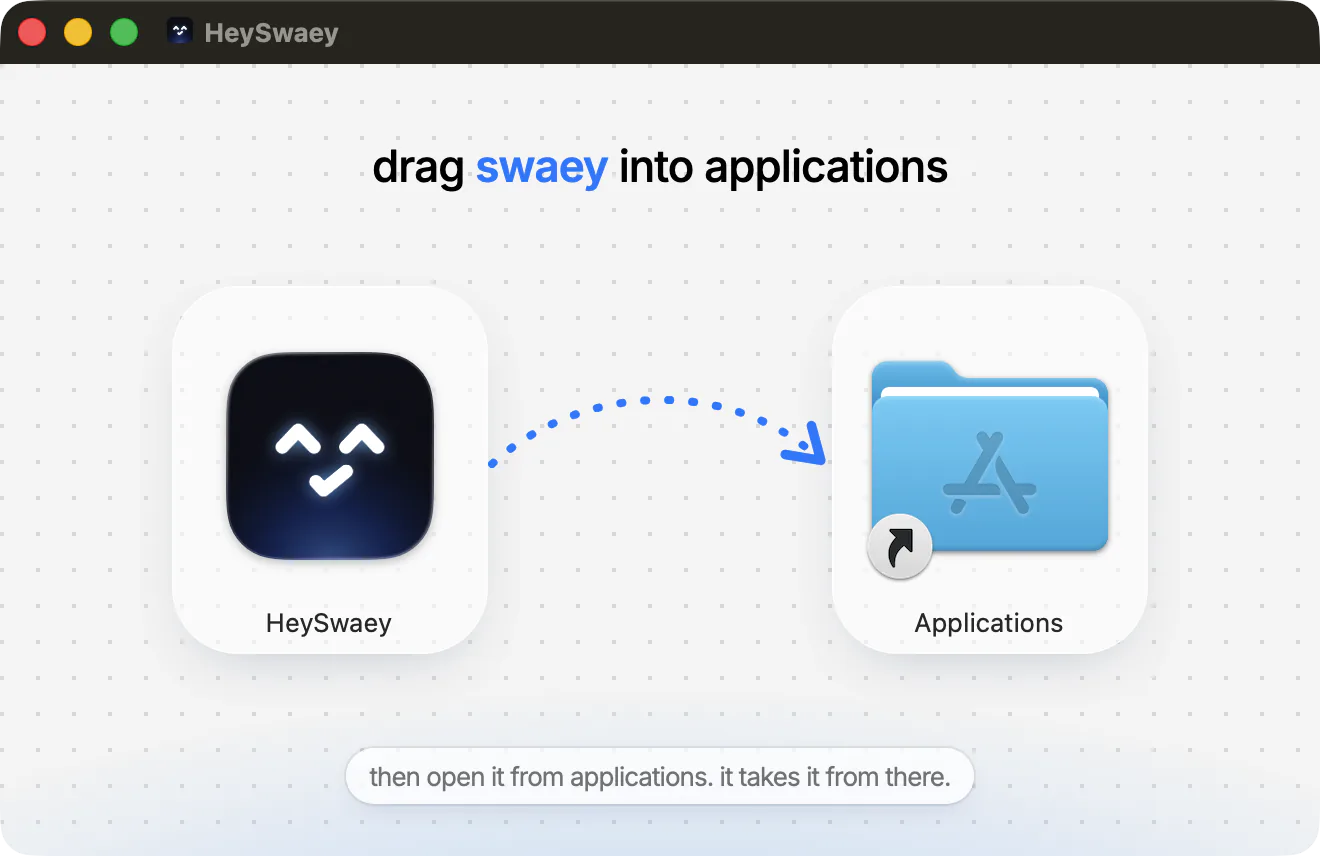
    drag swaey into applications

    open HeySwaey.dmg from your downloads, then drag the swaey icon onto the applications folder.

  2. 2

    open it, then click done

    open swaey from applications. the first time, macOS double-checks apps from outside the app store. click done.

  3. 3

    click “open anyway”

    open system settings → privacy & security, scroll down, click open anyway and enter your mac password.

you only do this once. updates install themselves, no prompts.

faq

frequently asked questions

what to know about swaey, privacy, and getting started.

Swaey Help
is it always listening?

it listens for “hey swaey” on-device, the same way your mac’s dictation works, and nothing leaves your mac until you say it. prefer a key? turn the wake word off and just use ⌥↑.

does it look at my screen?

only when you ask. “explain this”, “what’s on my screen” or a part you box with ⌃⌘A takes one screenshot right then, and the privacy tab lists it. it doesn’t record your screen, and you can switch screen looking off in settings → privacy.

what leaves my mac?

your voice doesn’t. hearing and speaking run on your mac. when a command needs the ai (pro tries, pro and max), only its text goes through our server to our ai provider, which doesn’t train on it. the privacy tab lists every single request.

will it do things without asking?

not the risky ones. sending email, deleting files, shell scripts and shutting down always ask “should i go ahead?” first. answer out loud or click. say “stop” anytime to end it instantly.

what is heyswaey?

a voice agent that lives in your mac’s notch. say “hey swaey” (or press ⌥↑), tell it what you want, and it does it: opens apps and files, sends email, plays music, sets reminders, types for you, runs coding agents and a lot more.

why does my mac ask me to confirm it the first time?

swaey is sold directly from this site, not through the app store, so the first time you open it macOS asks you to confirm it: system settings → privacy & security → open anyway. it’s a one-time step and updates install without asking. prefer no prompt at all? use the one-line install.

which macs does it run on?

macOS 15 or later on apple silicon (M1 and newer). it’s mac only, on purpose: native swift, built to feel like it shipped with your mac.

does it understand my accent?

yes. during setup you say “hey swaey” four times so it learns how your voice sounds. hearing runs on your mac, handles accents well and lets you switch languages mid-sentence.

what’s free, exactly?

voice typing and quick commands (apps, files, websites, timers, reminders, weather, music) are free and unlimited, on your mac, with no card and no account. sign in with your email (free, no password) and you also get 25 pro tries of swaey’s ai every month, for anything that needs it. a refusal or an error doesn’t use a try. the notch shelf, clipboard history and music controls stay free forever, and so do coding-agent alerts: swaey reads out what claude code wants and you answer yes, always or no. after the month’s pro tries, swaey’s ai (asking, planning, doing things for you) comes with pro at $15 a month or $120 a year.

can it clip videos?

yes. open a video on your mac, or copy a youtube link, and say “clip from 1:20 to 1:50, vertical”, or pick the part in the clip editor. captions, following the speaker, cutting the pauses and saving all happen on your mac, free on every plan; a free plan’s clips carry a small “made with swaey” tag. finding a part by what’s said, the best moments and hook titles use pro tries. links are for videos you own or have permission to save.

do students get a discount?

yes: 10% off any plan with a school email (.edu, .ac.uk and the like). buy with that email, or sign in to the app with it, and the student price is taken off at checkout.

what’s the difference between pro and max?

max thinks harder where it matters. lessons on the board, the prompts swaey writes for your coding tools, your agents’ plans in plain words, code checks (can i trust this, fix this error, review the design) and mini apps all run on our smartest ai. quick commands stay on the fast one, so nothing slows down. max also has about 7× pro’s monthly ai allowance (it resets on the 1st), for long multi-step tasks all day. you can switch between them anytime in settings → plan, and paddle prorates the difference.

i bought on the website. how do i get my plan in the app?

open heyswaey, go to settings → plan and sign in with the email you used at checkout. we email you a link (no password) and your plan is there. you can cancel anytime from manage subscription.

how is this different from siri?

siri is great with timers and apple’s own apps. swaey is built to get real work done across your whole mac: gmail, youtube, slack, files, coding agents and routines. it remembers you and learns the skills you teach it.

windows or iphone?

not planned. swaey is built for the mac, and we’d rather make one thing great.

HEYSWAEY.APP_□×

say hey.

your mac has been waiting for a voice.

free to start. macOS 15 or later on apple silicon